FOLLOW OUR SOCIAL MEDIA
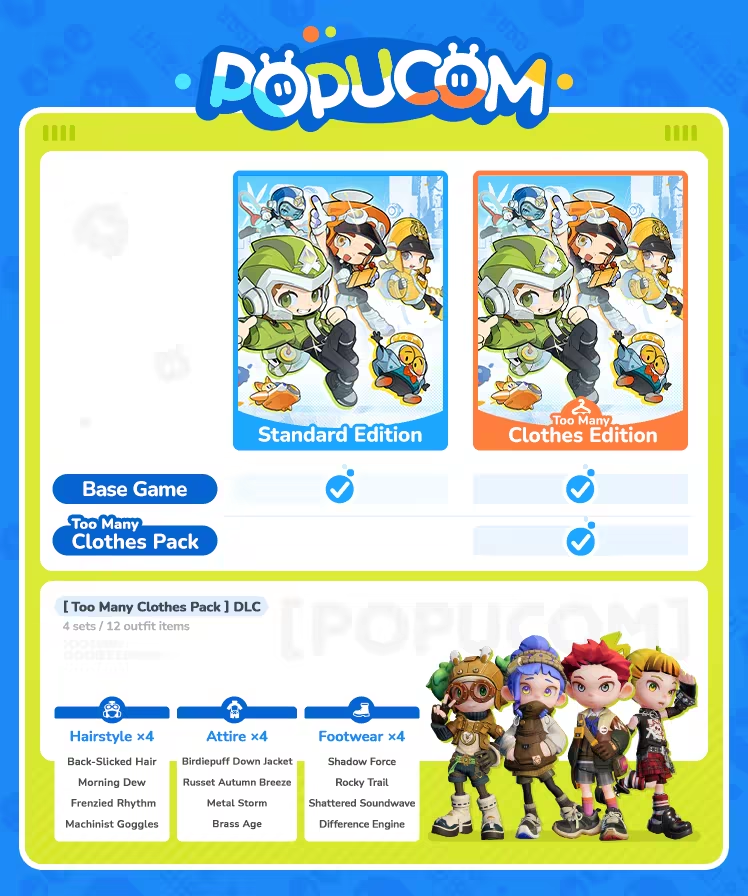
Too Many Clothes Edtion
About the Game
POPUCOM is a multiplayer co-op platform adventure game. As an adventurer, you are summoned to an unknown planet to embark on an exoplanet adventure with your friends. You will face various enemies and use engaging items and techniques to eliminate threats and restore the world to its former glory.

Work together with your friends to take on a variety of challenges. Effective cooperation and strong teamwork are the only ways forward. Whether it's facing powerful enemies or tackling complex puzzles, you'll need to work together to triumph!

Color plays a crucial role in this fantastical world. It is key to everything from puzzle solving to combat. You'll need to switch colors to activate mechanisms and solve puzzles, and shoot Pomu gel in different colors to change the surroundings and impact enemies. Master the techniques of color switching and match-3 shooting to overcome puzzles and defeat enemies!

During the journey, you will acquire items known as super artifacts. Examples of these wondrous artifacts include Rollo the Bomb, Captain Kitty, Barrier Bot, and Power Kid. Each of them grants you a unique ability that helps remove obstacles and solve puzzles in your adventure.

The adventure isn't just about combat; it's also about showcasing your style! Pick from a selection of gear and cosmetics in the Closet and combine them to create your unique looks. Then you can set off on the journey in your personalized style!

In addition to the exciting battles and engaging puzzles, the game includes a number of enjoyable mini-games. Head to the in-game arcade room for some lighthearted arcade fun during breaks from the main stages.
1、所有游戏一经使用将永久与您Steam平台帐号绑定,无法剥离,无法二次销售,因此售出的商品不提供任何退换货服务(包括但不限于买错游戏,配置不符,网络问题,游戏限区等)。如您对此持有异议,请勿购买。强烈建议您在购买游戏之前,先了解游戏的配置要求,语言版本,使用地区等基本信息。
2、本店只出售steam激活码,不会索要账号及密码,不会提供低价区礼物,所以请放心,不会对账号造成任何损害。如有其他人员假借平台名义索要任何账号相关内容请勿上当受骗。
3、所有激活码均为正版渠道,价格相比礼物区会贵点,不会有红号、礼物索回等风险。
4、如有其他问题或者合作建议,请与我们联系。诚邀各位游戏开发运营商、以及有推广意向的用户合作。
一、付款成功后,可在查询订单在中,提取CDK.

一、打开Steam客户端,点击右下角《添加游戏》,选择--在Steam上激活产品....

三、输入订单中的CDK,点击下一步,就可以添加入库了。