
Connection Methods
The game supports Steam Remote Play Together, but if you experience severe lag or latency when using Remote Play Together, it is recommended to use third-party software for online play, such as Parsec.
Please refer to the official documentation for instructions on using Steam Remote Play Together.
Parsec Illustrated Tutorial
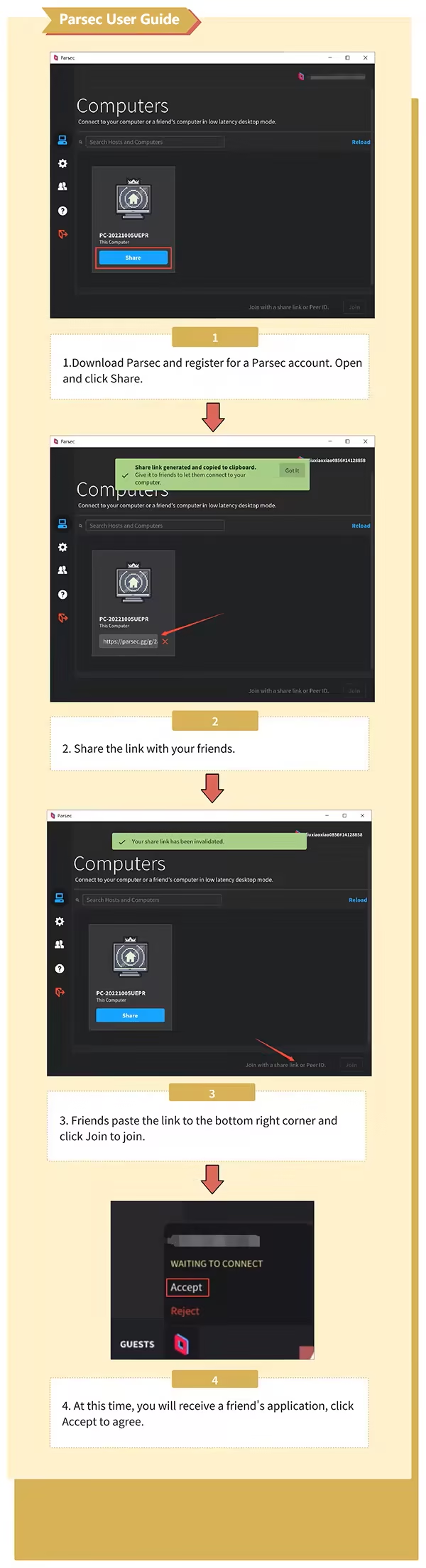
About the Game
PS. This game currently only supports two-player local play! But we don’t mind you challenging yourself to control two players at once and unlock all the achievements! We believe this will be a great feat. You can also invite your friends to join the competition using the STEAM Remote Play Together feature.
Welcome to the world of toys, where you will be provided with a stage for free battle! Use your fists or randomly dropped weapons to start a crazy melee! The only rule in this "performance" is: don't take it too seriously, as happiness is the only goal.
Do as you please and fight wildly
Supports multiple players battling on the same stage, with no complicated rules or the need for precise calculations. Your only goal is to defeat your opponents or knock them off the stage.
Diverse maps and varied scenes
Switch randomly between a variety of maps, while randomly distributed dangerous traps and unpredictable meteorites pose threats. Please be careful to dodge them.
Playful skins, relaxed battles

Bananas? Spacesuits? Hot dogs? Hmm...
A wide range of quirky skins awaits your discovery, inspired by your daily life or internet memes.
Multiple weapons, one-click use
Pick up randomly dropped weapons and fire bullets into the sky! Or, at your opponents~ Various melee and ranged weapons will be randomly scattered across the map, waiting for you to use them.
1、所有游戏一经使用将永久与您Steam平台帐号绑定,无法剥离,无法二次销售,因此售出的商品不提供任何退换货服务(包括但不限于买错游戏,配置不符,网络问题,游戏限区等)。如您对此持有异议,请勿购买。强烈建议您在购买游戏之前,先了解游戏的配置要求,语言版本,使用地区等基本信息。
2、本店只出售steam激活码,不会索要账号及密码,不会提供低价区礼物,所以请放心,不会对账号造成任何损害。如有其他人员假借平台名义索要任何账号相关内容请勿上当受骗。
3、所有激活码均为正版渠道,价格相比礼物区会贵点,不会有红号、礼物索回等风险。
4、如有其他问题或者合作建议,请与我们联系。诚邀各位游戏开发运营商、以及有推广意向的用户合作。
一、付款成功后,可在查询订单在中,提取CDK.

一、打开Steam客户端,点击右下角《添加游戏》,选择--在Steam上激活产品....

三、输入订单中的CDK,点击下一步,就可以添加入库了。





















